

A practical breakdown of what actually drives DAST coverage — and why it isn't just "scan longer."
The Question We Kept Asking
When you run a dynamic application security scan (we used OWASP ZAP for this exercise), there are two levers everyone reaches for first:
- How long do I let it run?
- How deep/wide do I let the crawler go?
Those matter. But after running the same target application through several scan configurations — different time budgets, with and without pre-recorded traffic — a third variable turned out to matter more than either: what URLs does the scanner actually know exist.
This post walks through what we found, quantified, across real scan runs.
Setup: Same App, Four Different Runs
We scanned a modern single-page application (Next.js, client-side routing, React Server Component fetches, proxied API calls) under four configurations:
| Run | Duration cap | HAR traffic seeded? | Outcome |
|---|---|---|---|
| A | 4 hours (extreme profile) | Yes | Time-capped, ~50 rule types executed |
| B | 90 minutes (veryhigh profile) | Yes | Time-capped, ~17 rule types executed |
| C | 90 minutes (veryhigh profile) | Yes | Time-capped, ~17 rule types executed, auth working |
| D | 90 minutes (veryhigh profile) | No | Completed naturally in ~29 minutes, ~50+ rule types executed |
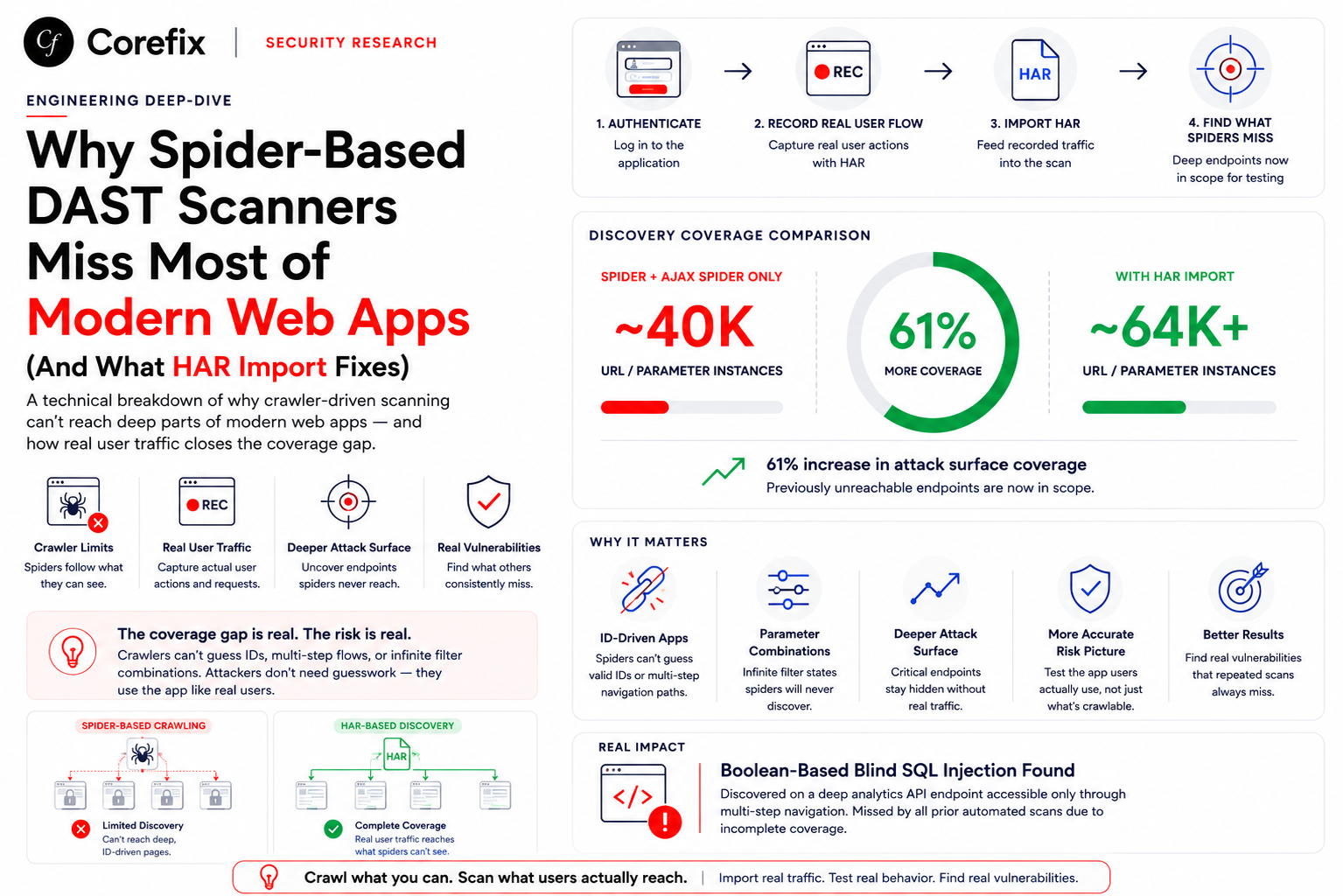
The last one is the interesting one. Run D had the same time budget as Run C, but finished in a third of the allotted time — because without HAR-derived traffic, the scanner simply didn't know about most of the application's actual surface area.
What HAR Recording Actually Buys You
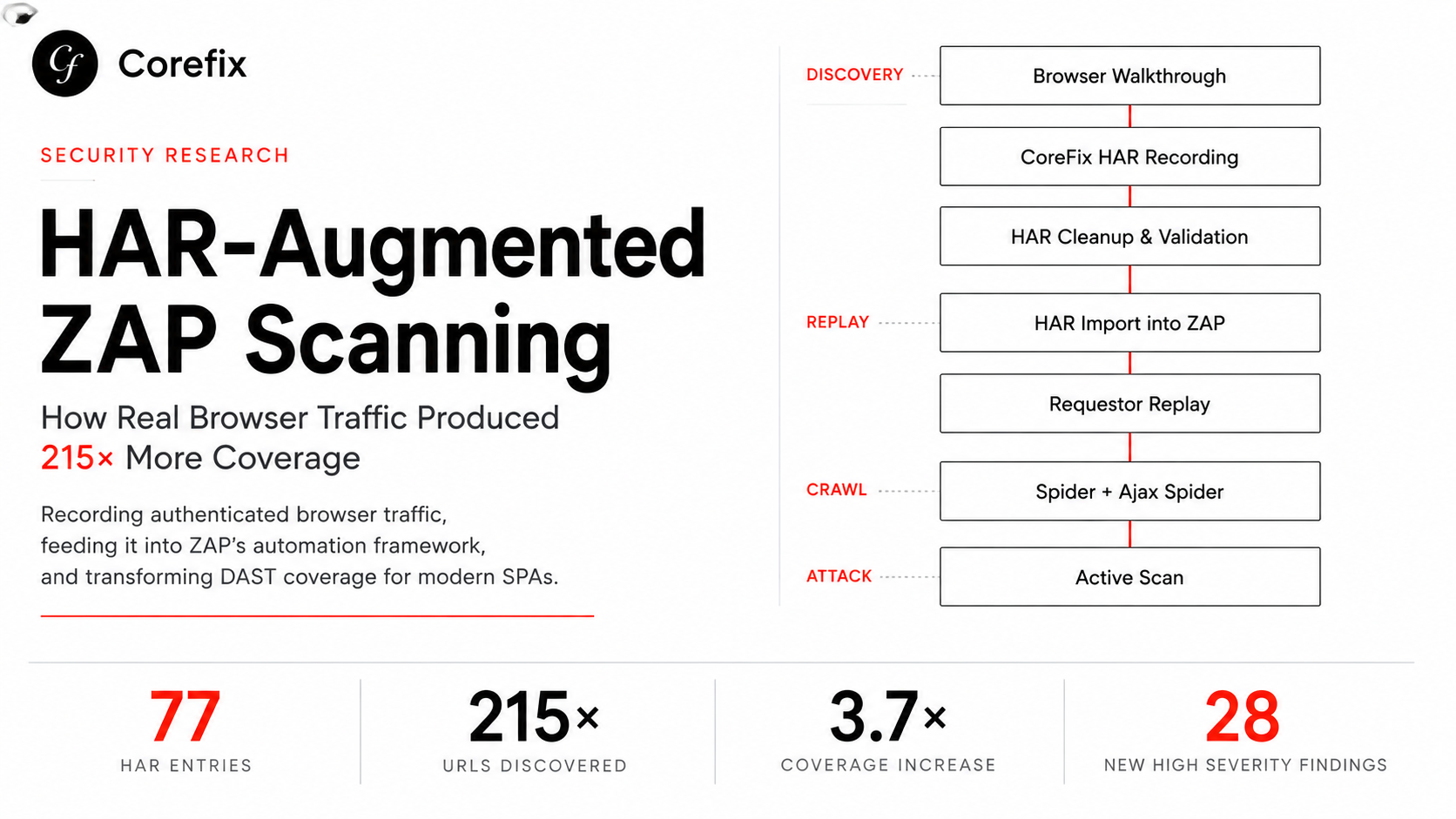
A HAR (HTTP Archive) file is a recording of real network traffic — every request and response your browser made during a session. When you feed that into a scanner as a seed for its spider, you're handing it a map of routes that:
- require authentication to reach
- are only ever requested via
fetch()/XHR, never linked in the DOM - are React Server Component payload fetches (
?_rsc=...) that a generic crawler has no reason to guess - sit behind multi-step workflows (create → configure → attach → view)
- are proxied API routes (
/api/proxy/...) with no discoverable pattern
A generic spider — even ZAP's AJAX spider, which executes JavaScript and clicks around — can only find what's reachable by exploration. It doesn't know your business logic. It doesn't know that submitting a form on page 3 of a wizard reveals an endpoint that only exists after that submission.
The numbers, side by side
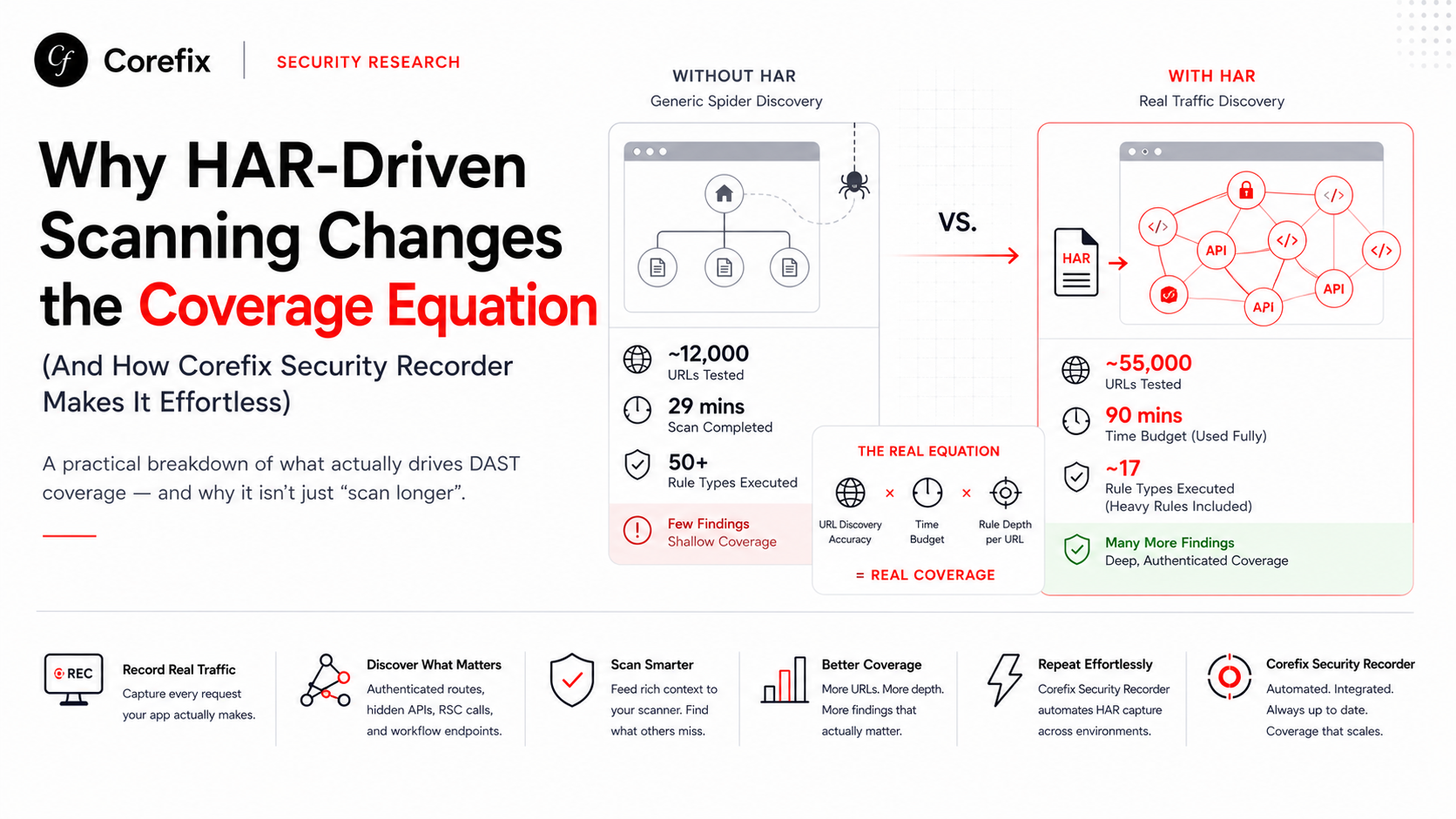
Comparing a 90-minute scan with HAR-seeded traffic against a 90-minute scan without it, on the same application:
| Metric | With HAR | Without HAR |
|---|---|---|
| Total URLs tested by active scan | ~55,000 | ~12,000 |
| AJAX spider-discovered URLs | 316–1,296 | 40 |
| Scan finished naturally or got time-capped | Time-capped | Finished early, 61 min to spare |
| Rule types that got to execute | ~17 (heavyweight rules like SQLi ran but got cut off) | ~50+ (broad coverage, but shallow per rule) |
And this is the part that matters most — findings, not just URL counts:
| Vulnerability class | With HAR | Without HAR |
|---|---|---|
| SQL Injection alerts | 2 (on 14,128 URLs tested) | 0 (on 683 URLs tested) |
| Path Traversal alerts | 9 (on ~10,000 URLs) | 1 (on 230 URLs) |
| Reflected XSS alerts | 10 (on 200 URLs) | 1 (on 75 URLs) |
| Persistent XSS alerts | 10 | 0 |
Without HAR, the scanner spent its budget re-discovering shallow, mostly public-facing pages. With HAR, it spent that same budget hammering the authenticated, parameter-rich, business-logic-heavy routes where injection vulnerabilities actually tend to live.
The takeaway: URL discovery quality is a bigger lever on finding real vulnerabilities than scan duration is. A longer scan against a shallow URL set still finds shallow things. A shorter scan against a rich, real URL set finds real things faster.
The Trade-Off Nobody Tells You About
HAR-seeded scanning isn't free. There's a real trade-off, and it's worth naming honestly:
More real URLs = more test surface = more time consumed per rule.
When we ran the HAR-fed scan against a 4-hour budget, it still didn't finish — heavyweight rules like SQL Injection and Path Traversal are inherently slow because they send many payload variations per parameter, and a rich, authenticated URL set multiplies that out fast. In our 90-minute HAR-fed runs, only about a third of the total rule catalog even got a turn before the clock ran out; entire vulnerability classes (SSRF, SSTI, command injection, buffer overflow) sat in the queue and never executed.
So the real equation looks like this:
Coverage quality = f(URL discovery accuracy) × f(time budget) × f(rule depth per URL)You can't fix a shallow URL set by giving it more time — you're just scanning the wrong things for longer. But you also can't fix a time-starved scan by feeding it more URLs — you're just making the queue longer without making the clock run slower.
Both levers need to be right. And getting the URL set right is the harder, more manual half of that problem — traditionally.
Where This Gets Painful in Practice
Getting a good HAR file historically means:
- Manually clicking through your app in DevTools with the Network tab recording
- Making sure you hit every workflow — including edge cases, multi-step forms, and admin-only views
- Re-recording every time the app changes meaningfully
- Stripping or managing sensitive tokens/cookies before handing the file to a scanner
- Repeating all of this for every environment (staging, pre-prod, per-release)
For a fast-moving team, this turns into either skipped steps (leading to the shallow-coverage problem above) or a manual QA-style burden that nobody wants to own.
How Corefix Security Recorder Solves This
This is exactly the gap Corefix Security Recorder is built to close.
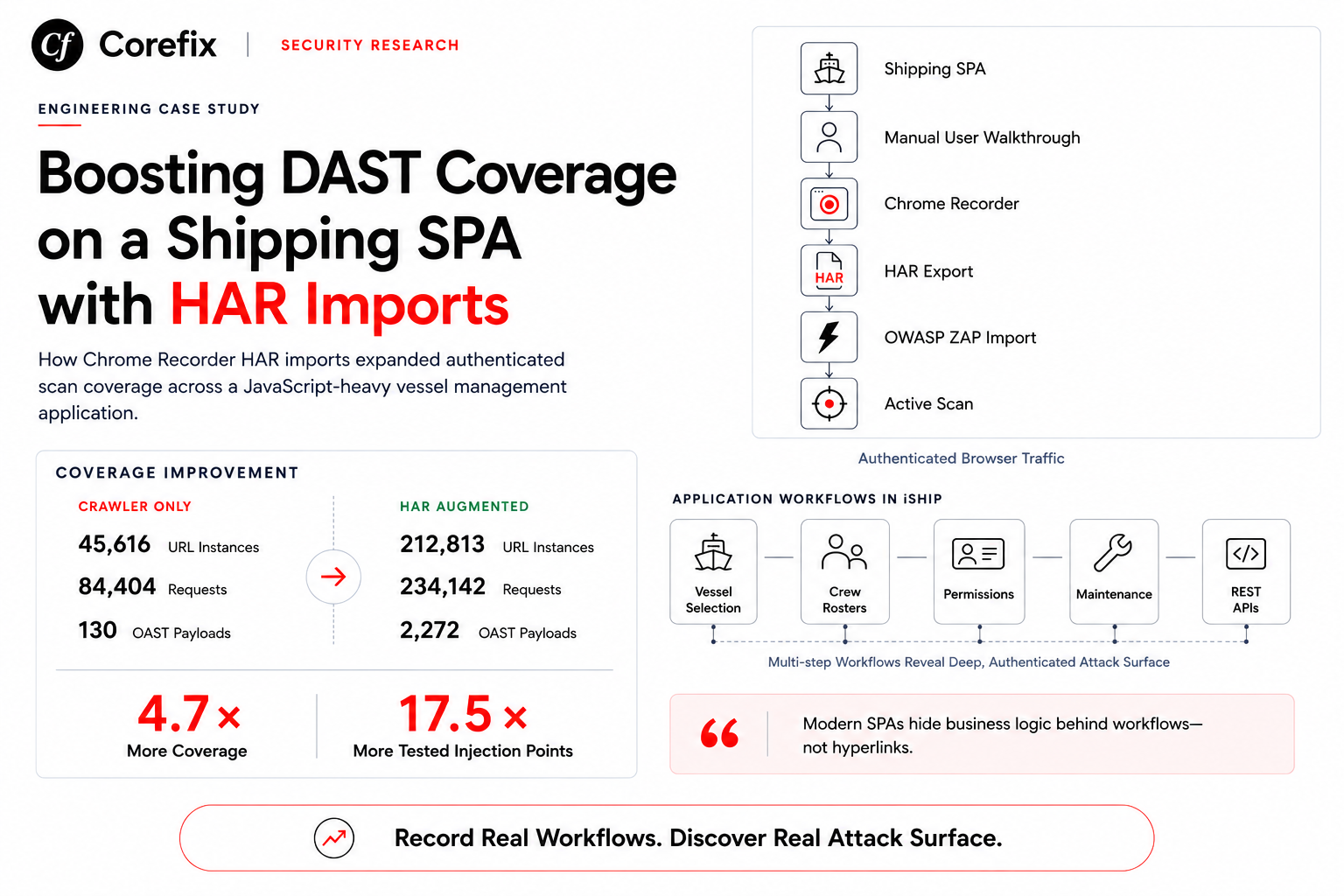
Instead of manually curating a HAR file or hoping a generic spider stumbles onto your real application surface, Corefix Security Recorder gives you a no-code way to capture real traffic as you (or your QA team) naturally use the application:
- Record once, naturally. Click through your app the way a real user would — log in, navigate the dashboard, submit forms, trigger the workflows that matter. Corefix captures the full request/response traffic in the background, no scripting or instrumentation required.
- Comprehensive by construction. Because it's recording actual usage rather than guessing at routes, it captures authenticated pages, RSC/client-fetch calls, proxied API routes, and multi-step workflow endpoints — the exact category of URLs that generic spiders miss and that our data above shows matters most for finding real vulnerabilities.
- Replay for assessment. That recorded session becomes the seed traffic for a comprehensive vulnerability scan — replayed against your application to drive deep, targeted active scanning across the routes that genuinely reflect how your app is used, not how a crawler guesses it might be structured.
- No code, no maintenance burden. There's no HAR export/import ceremony, no manual stripping of tokens, no separate recording tool to maintain — capture and replay live in one workflow, so re-recording after a release is a five-minute task instead of a re-run of a manual QA pass.
In effect, Corefix Security Recorder turns "getting good HAR coverage" from a manual, easily-skipped chore into a natural byproduct of using your app — which, based on everything above, is the single highest-leverage input into whether a DAST scan actually finds the vulnerabilities that matter.
Practical Recommendations
If you're setting up your own scan pipeline, here's what the data above suggests:
- Prioritize traffic capture quality over scan duration. A HAR-seeded 90-minute scan will often out-perform a HAR-less 4-hour scan on real findings.
- Don't treat "scan completed naturally" as a good sign by itself. In our tests, the fastest-finishing scan was also the one with the shallowest real-world coverage — it finished early because it ran out of known URLs, not because it was thorough.
- Budget for both dimensions. Use rich, replayed traffic to get the right URL set, and give heavyweight rule classes (SQLi, command injection, SSRF, SSTI) enough time per rule to actually complete rather than getting cut off mid-scan.
- Re-capture traffic regularly. Application surfaces change fast, especially in SPA/API-heavy architectures — a six-month-old HAR file is testing yesterday's app.
- Automate the capture step. Manual HAR recording is the piece most likely to get skipped under deadline pressure — which is precisely why tools like Corefix Security Recorder that make it a no-code, always-on part of the workflow are worth adopting.
Have questions about setting up HAR-driven scanning for your own application, or want to see how Corefix Security Recorder fits into your existing pipeline? Reach out — we're happy to walk through it.