

How recording real browser traffic with the Corefix Extension and feeding it into ZAP's automation framework transforms DAST coverage from surface-level to deep.
The problem with scanner-only discovery
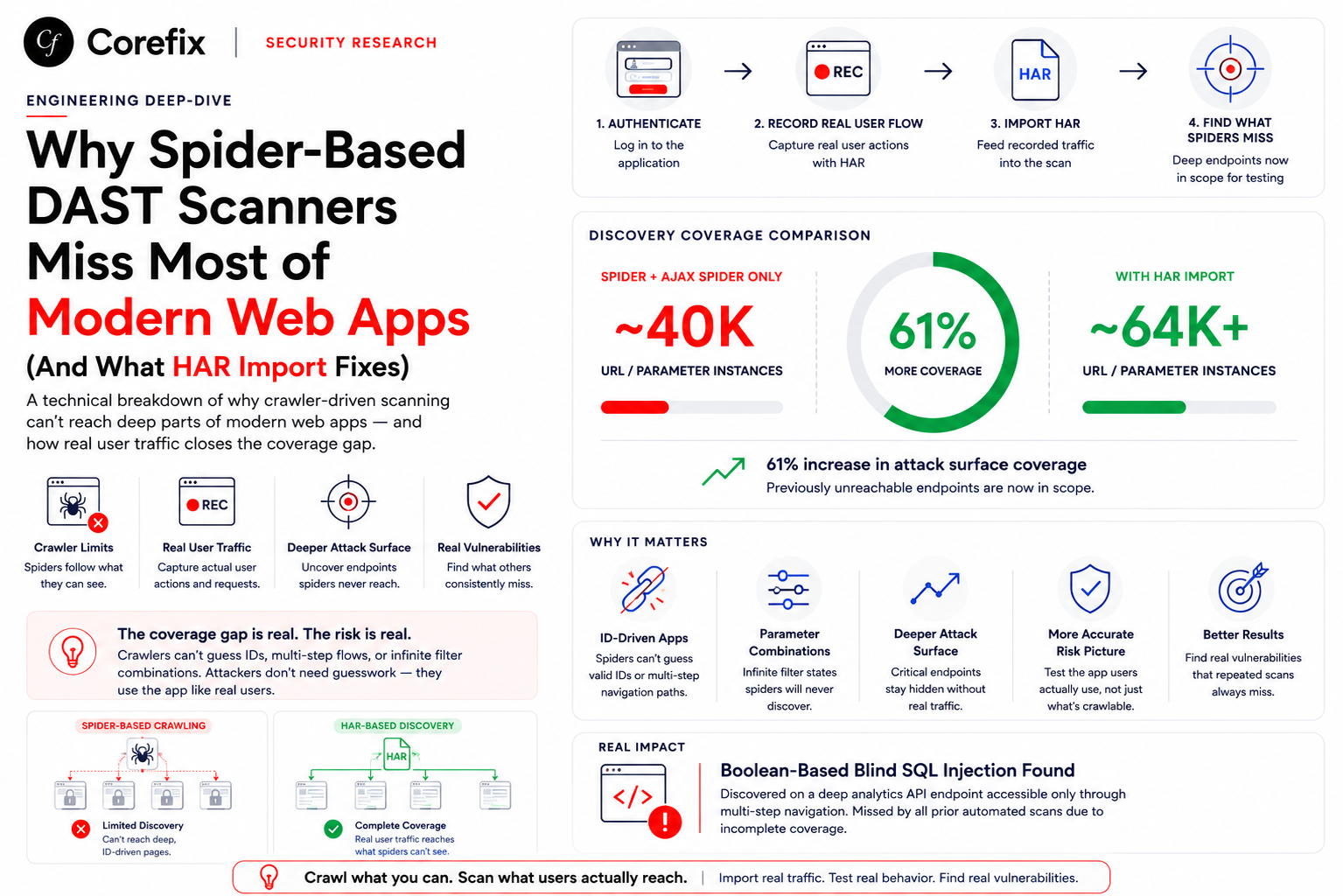
Dynamic Application Security Testing (DAST) tools like OWASP ZAP are powerful, but they share a fundamental limitation: they can only test what they can find. ZAP's built-in spiders — both the traditional crawler and the Ajax spider — navigate applications by following links, parsing HTML, and executing JavaScript. For modern single-page applications (SPAs) built with Angular, React, or Vue, this approach misses a significant portion of the attack surface.
API endpoints behind form submissions, multi-step checkout flows, authenticated-only routes, WebSocket interactions, and dynamic client-side routing all create blind spots. The scanner dutifully tests what it discovers, but if it never discovers your /api/BasketItems/ POST endpoint or your /rest/order-history route, those remain untested.
This post documents a practical approach to solving this: recording real browser traffic as HAR (HTTP Archive) files using the Corefix Extension, preprocessing them, and feeding them into ZAP's automation framework to dramatically expand scan coverage.
Architecture overview
The approach works in three stages:
- Record — The Corefix Extension captures all HTTP traffic as the tester manually walks through the application, exercising authenticated flows, API calls, and multi-step processes.
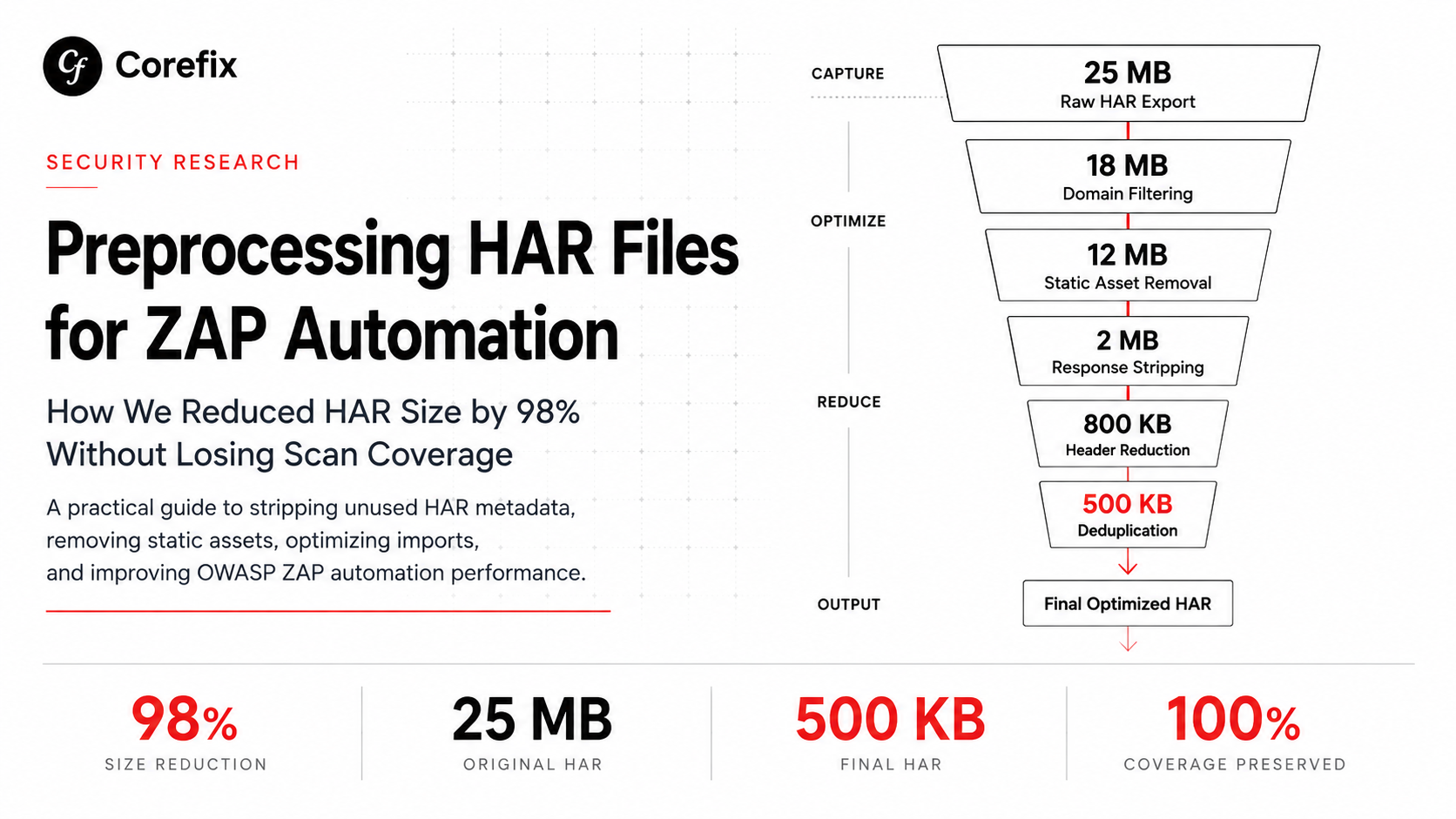
- Preprocess — The raw HAR is cleaned (removing static assets, deduplicating entries, splitting into manageable chunks) and validated to ensure entries actually exist before passing to ZAP.
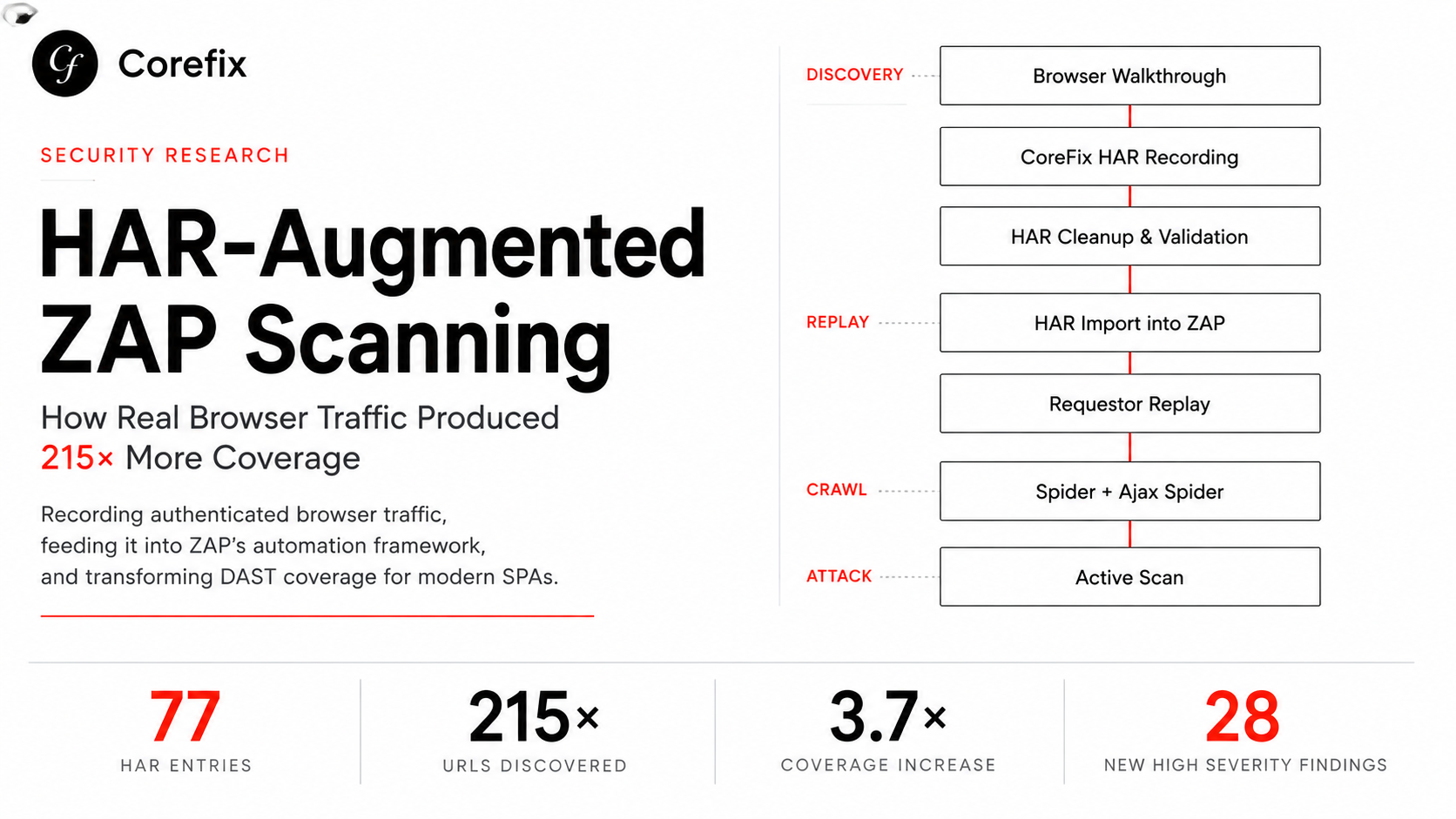
- Replay & scan — ZAP's automation framework imports the HAR chunks, replays key endpoints via the requestor job, then spiders and actively scans the vastly expanded site tree.
The key insight is that human testers naturally exercise the application in ways automated crawlers cannot. By capturing that traffic and feeding it to ZAP, you combine human discovery with automated vulnerability detection.
Target application
All testing was performed against OWASP Juice Shop, a deliberately vulnerable Node.js/Angular application running on http://74.225.252.175:3000. Juice Shop is an ideal test subject because it has a rich SPA frontend with many API endpoints, authentication flows, and business logic routes that are invisible to traditional crawlers.
Test methodology
Two scans were performed against the same target with identical authentication configuration:
- Scan A (baseline): Standard ZAP automation with spider + Ajax spider + active scan. No HAR context provided.
- Scan B (HAR-augmented): Same scan pipeline, but seeded with 77 HAR entries captured via the Corefix Extension, plus a requestor job replaying key authenticated endpoints.
Both scans used the same ZAP version (2.17.0), the same authentication credentials (admin@juice-sh.op), and the same active scan policy.
Recording traffic with the Corefix Extension
The Corefix Extension acts as a transparent proxy or browser instrumentation layer that captures all HTTP/HTTPS traffic during a manual testing session. The recording covered:
- Full authentication flow (login, token acquisition)
- Product browsing and search
- Basket operations (add, remove, view)
- Checkout flow (address, delivery, payment, order confirmation)
- Profile management and photo upload
- Admin panel access
- Feedback and complaint submission
- Order tracking and history
- Captcha interactions
- WebSocket connections
The recording session produced a HAR file that was then split into 5 time-based chunks for parallel import:
chunk_2026-06-16T14-14-28-993Z-clean-0.har
chunk_2026-06-16T14-15-29-604Z-clean-1.har
chunk_2026-06-16T14-16-28-957Z-clean-2.har
chunk_2026-06-16T14-17-28-918Z-clean-3.har
chunk_2026-06-16T14-18-08-729Z-clean-4.har
Validating HAR files before scanning
A critical lesson learned during this experiment: always validate that your preprocessed HAR files contain actual entries before kicking off a scan. An initial run appeared to succeed but stats.exim.importer.har.count was 0 — the preprocessing pipeline had silently produced empty files.
The fix is simple:
# Verify each chunk has entries
for f in /zap/wrk/chunk_*-clean-*.har; do
  count=$(jq '.log.entries | length' "$f")
  echo "$f: $count entries"
  if [ "$count" -eq 0 ]; then
    echo "ERROR: Empty HAR file detected. Fix preprocessing before scanning."
    exit 1
  fi
done
ZAP automation framework configuration
Authentication setup
Both scans used JSON-based authentication with header-based session management. An important configuration difference in the HAR-augmented scan was switching from cookie-based to Bearer token session handling, which better matches Juice Shop's JWT architecture:
sessionManagement:
  method: headers
  parameters:
    Authorization: Bearer {%json:authentication.token%}
Job pipeline
The HAR-augmented automation YAML follows this job sequence:
passiveScan-config  →  Configure passive rules BEFORE any traffic
import-har (×5)     →  Seed site tree with recorded traffic
requestor           →  Replay authenticated endpoints (GET + POST)
spider              →  Crawl discovered links
ajaxSpider          →  JavaScript-aware crawling
activeScan          →  Vulnerability testing
passiveScan-wait    →  Wait for passive analysis
report (×3)         →  JSON + Auth-JSON + HTML reports
The requestor job
Beyond importing HAR files, the requestor job explicitly replays key authenticated endpoints to ensure they appear in ZAP's site tree with valid session tokens. This is especially important for POST endpoints that the spider cannot discover:
- name: requestor
  type: requestor
  parameters:
    user: zap-user
    context: ZAP-Context-1781619657762
  requests:
    - url: http://target:3000/api/BasketItems/
      method: POST
      data: '{"ProductId":1,"BasketId":"1","quantity":1}'
    - url: http://target:3000/api/Feedbacks/
      method: POST
      data: '{"UserId":1,"captchaId":0,"captcha":"","comment":"test","rating":3}'
    # ... 40+ additional endpoints
Active scan policy tuning
The scan policy was configured with targeted rule overrides for high-value vulnerability classes:
| Rule ID | Rule name | Strength | Threshold |
|---|---|---|---|
| 40018 | SQL injection (time-based) | Insane | Low |
| 40012 | XSS (reflected) | Insane | Low |
| 40026 | Cross-site request forgery | Insane | Low |
| 40024 | SQL injection (plugin-based) | Insane | Low |
| 90018 | Advanced SQL injection | High | Low |
| 6 | Path traversal | High | Low |
| 90020 | Remote OS command injection | High | Low |
| 90037 | Server-side request forgery | High | Low |
Results: head-to-head comparison
Discovery metrics
| Metric | Without HAR | With HAR | Improvement |
|---|---|---|---|
| Spider URLs found | 18 | 3,866 | 215× |
| Spider URLs added to tree | 45 | 4,251 | 94× |
| Active scan URLs tested | 35,909 | 132,208 | 3.7× |
| Network requests sent | 37,831 | 162,688 | 4.3× |
| HTTP 200 responses | 572 | 5,953 | 10.4× |
| DOM XSS scan targets | 67 | 577 | 8.6× |
| Passive scan records | 137 | 670 | 4.9× |
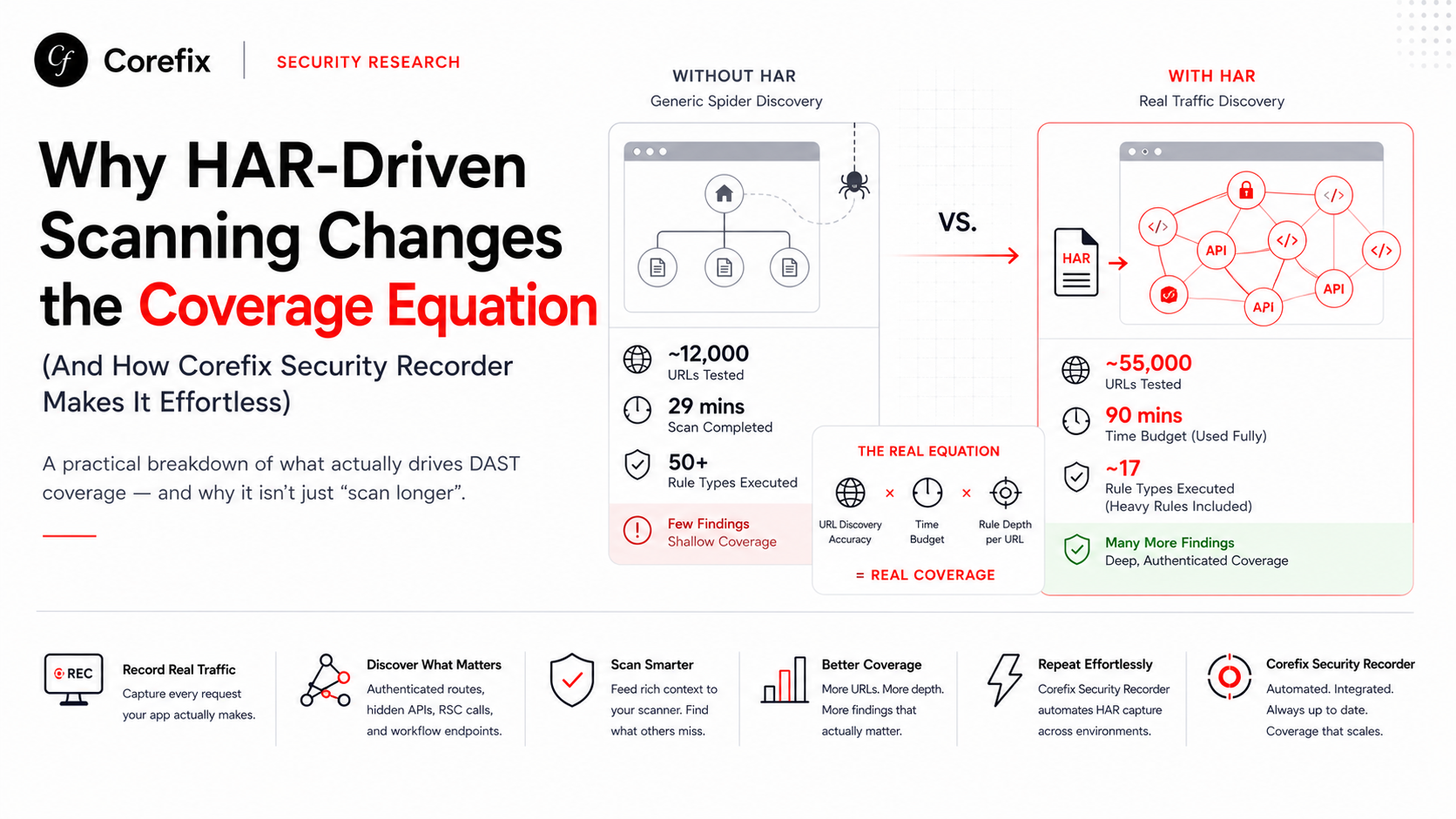
The HAR import seeded ZAP with 77 real HTTP transactions, which the spider then used as starting points to discover 3,866 additional URLs — a 215× increase over the 18 URLs found through crawling alone.
New vulnerability classes discovered
The most significant outcome: three entirely new active scan vulnerability classes appeared only in the HAR-augmented scan:
| Scanner ID | Vulnerability | Alerts | Severity |
|---|---|---|---|
| 40012 | Cross-site scripting (reflected) | 10 | High |
| 40014 | Cross-site scripting (persistent) | 10 | High |
| 43 | XML external entity (XXE) attack | 8 | High |
These 28 high-severity findings were invisible to the baseline scan because the vulnerable endpoints were never discovered by the spider. The HAR file contained the API calls that exercise these code paths, giving ZAP the context it needed to test them.
Passive scan alert growth
The expanded traffic volume also dramatically increased passive scan findings:
| Rule | Without HAR | With HAR | Growth |
|---|---|---|---|
| Missing security headers (90005) | 2,356 | 17,844 | 7.6× |
| Timestamp disclosure (10096) | 242 | 7,770 | 32× |
| Insufficient site isolation (90004) | 44 | 7,639 | 174× |
| Cacheable content (10049) | 589 | 4,455 | 7.6× |
| Cross-domain JavaScript (10098) | 510 | 4,307 | 8.4× |
| Missing CSP (10038) | 22 | 3,806 | 173× |
| Missing permissions policy (10063) | 98 | 3,880 | 40× |
| Base64 disclosure (10094) | 25 | 3,783 | 151× |
| Modern web app issues (10109) | 7 | 3,765 | 538× |
| Application error disclosure (90022) | 0 | 19 | New |
Visual comparison: passive scan growth
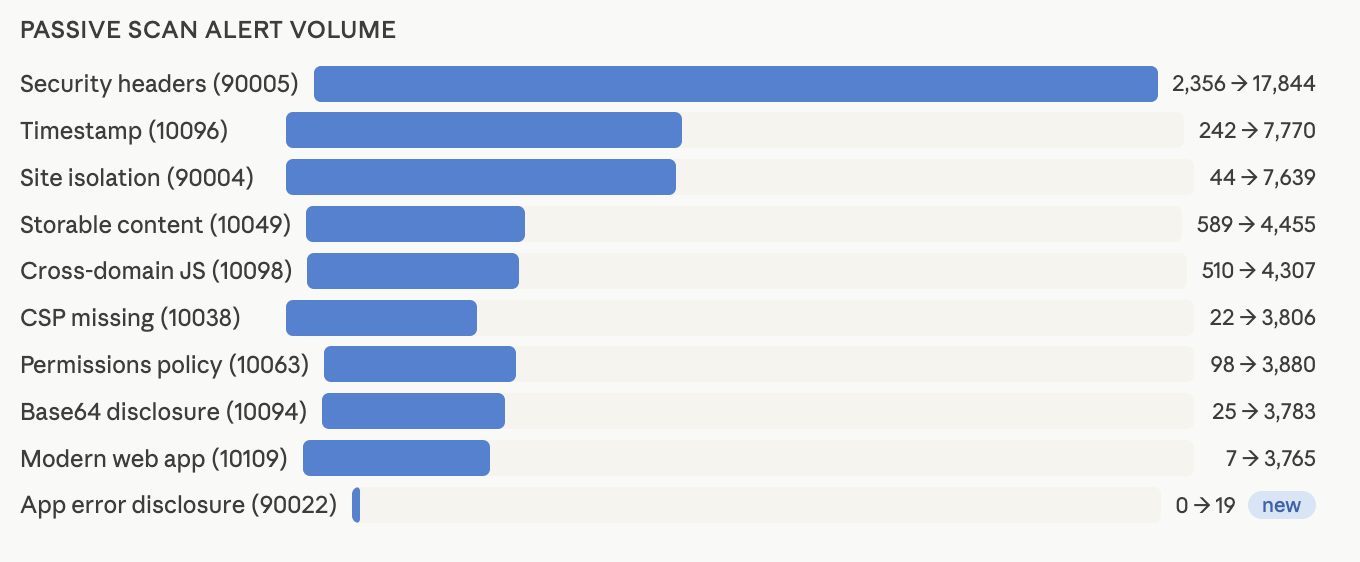
The increase in URL discovery directly translated into dramatically broader passive scan coverage. Once HAR traffic seeded authenticated routes, API endpoints, and application workflows that traditional crawling could not reach, ZAP began observing significantly more responses across the application.
Several passive scan categories experienced substantial growth. Security header findings increased from 2,356 to 17,844 alerts. Timestamp disclosures grew from 242 to 7,770. Missing Content Security Policy findings expanded from just 22 alerts to 3,806. Site isolation observations increased from 44 to 7,639, while modern web application detections grew from 7 to 3,765.
Most importantly, entirely new finding categories appeared. Application Error Disclosure (90022), which was absent in the baseline scan, surfaced 19 findings after HAR replay expanded the scanner's visibility into deeper application functionality.
The chart above illustrates how additional application context translates directly into broader passive security coverage. While passive findings do not always indicate exploitable vulnerabilities, they provide valuable visibility into security posture, misconfigurations, information disclosure risks, and missing defensive controls that would otherwise remain hidden.
Key observation
The growth in passive scan volume was not caused by more aggressive scanning. It was caused by better discovery. The scanner simply had access to a much larger portion of the application after importing 77 authenticated HAR entries and replaying critical workflows through the requestor job.
This reinforces a core lesson from the experiment:
Coverage quality is often more important than scanner aggressiveness.
A scanner cannot analyze endpoints it never discovers. HAR augmentation dramatically expands that visibility.
New content types discovered
The HAR-augmented scan also discovered content types that the baseline scan never encountered:
application/pdf— downloadable invoice/order documentsapplication/octet-stream— file download endpointstext/markdown— documentation/legal text endpoints- HTTP 201 (Created) responses — successful resource creation
- HTTP 404 (Not Found) responses — error handling paths
Lessons learned
1. Validate HAR import before scanning
The stats.exim.importer.har.count statistic is your early-exit check. If it reads 0 after the import jobs run, kill the scan immediately — your HAR files are empty or the paths are wrong. Don't wait 45+ minutes for a scan that has no additional context.
2. passiveScan-config must come first
A subtle but critical ordering issue: if passiveScan-config appears after passiveScan-wait, the configuration is applied after all passive scanning has completed — making it useless. The config job must be the first job in the pipeline, before any traffic-generating jobs.
3. Bearer tokens vs cookies matter
Juice Shop uses JWT authentication. The baseline scan used cookie-based session management (Cookie: token=...), while the HAR-augmented scan used the correct Authorization: Bearer ... header. This seemingly small change ensures all authenticated requests are properly credentialed, improving coverage of auth-protected endpoints.
4. Budget time for expanded attack surface
The baseline scan completed in ~12 minutes of active scanning. The HAR-augmented scan hit its 45-minute timeout and was stopped with approximately 15 scanner rules never executing. When you dramatically expand the URL tree, you must proportionally increase maxScanDurationInMins and maxRuleDurationInMins to accommodate the larger surface.
5. Exclude destructive endpoints
Active scanning sends malicious payloads to every discovered endpoint. Without exclude patterns, the scanner can hit password-change, account-deletion, or logout endpoints, breaking the authenticated session mid-scan. Always add excludePaths for these:
excludePaths:
  - .*\/rest\/user\/change-password.*
  - .*\/rest\/user\/reset-password.*
  - .*\/rest\/user\/erasure-request.*
  - .*\/dataerasure.*
6. POST endpoints need explicit requestor entries
The spider discovers URLs by parsing responses, but it cannot infer POST request body formats. Endpoints like /api/BasketItems/ (POST), /api/Feedbacks/ (POST), and /api/Complaints (POST) must be explicitly defined in the requestor job with sample payloads.
7. Technology scoping reduces noise
Setting the technology include list to match your actual stack (Node.js, MongoDB, Linux) tells ZAP to skip irrelevant checks (ASP.NET, PHP, Java-specific rules), reducing scan time and network load without sacrificing relevant coverage:
technology:
  include:
    - Db.CouchDB
    - Db.MongoDB
    - Language.JavaScript
    - Language.JavaScript.NodeJS
    - OS.Linux
    - SCM.Git
    - WS.Node
Recommended automation YAML structure
Phase 0: Configuration
  ── passiveScan-config (BEFORE any traffic)
  ── script setup (ACSRF tokens, custom hooks)

Phase 1: Seed
  ── import HAR chunks (×N)

Phase 2: Replay
  ── requestor (GET + POST authenticated endpoints)

Phase 3: Crawl
  ── spider (traditional, 10–15 min)
  ── ajaxSpider (JS-aware, 8–12 min)

Phase 4: Attack
  ── activeScan (tuned policy, 60–120 min budget)

Phase 5: Report
  ── passiveScan-wait
  ── report generation (JSON + HTML)
Why We Built Corefix
The results speak for themselves: recording browser traffic with the Corefix Extension and feeding it into ZAP's automation framework produced a 215× increase in URL discovery, a 3.7× increase in active scan coverage, and 28 new high-severity vulnerability findings that were completely invisible to the baseline scan.
The technique requires minimal additional effort — a 5-minute manual walkthrough of the application generates enough HAR data to transform scan quality. For any modern SPA or API-heavy application, this approach should be considered standard practice rather than optional enhancement.
The investment is a few minutes of manual browsing and a validated preprocessing pipeline. The return is dramatically better security coverage and findings that matter.
Your scanner should find vulnerabilities, not miss them because it never discovered the endpoints.
Tested with OWASP ZAP 2.17.0 against OWASP Juice Shop. Scan date: June 16, 2026.