

If you've ever tried to run an authenticated OWASP ZAP scan against a modern web application, you've probably hit this wall: the login looks like it worked, ZAP says "Authentication appeared to work," and yet every meaningful request in your scan comes back as 401 or 403 — and you don't find out until you're staring at a report full of noise instead of real vulnerabilities.
We hit exactly this problem while scanning one of our own UAT environments, and it's a perfect case study in why authenticated DAST scanning is so much harder than it looks.
A Tale of Two Scans
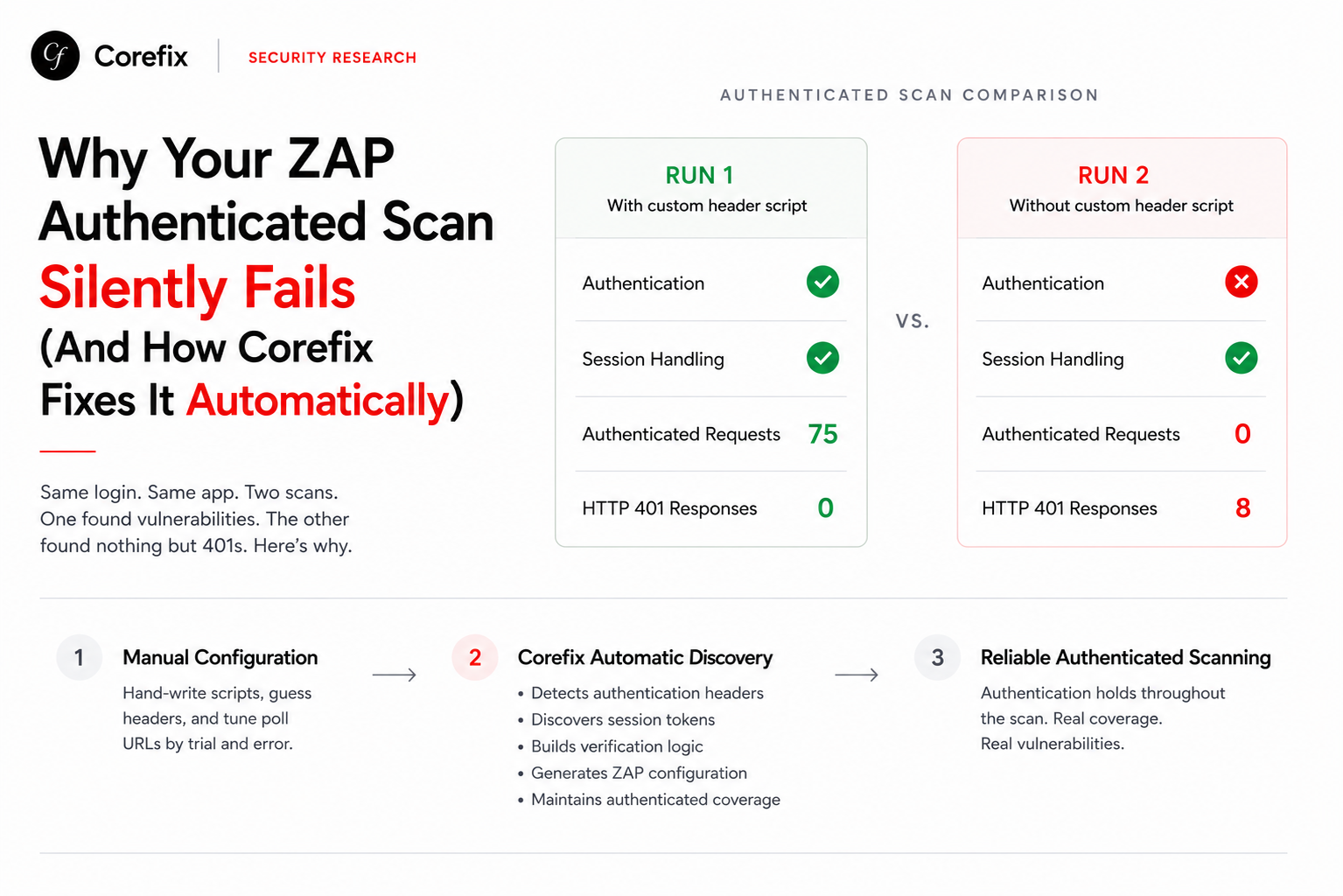
We ran the same ZAP Automation Framework plan against the same application, twice, minutes apart. The only thing that changed was whether a small custom httpsender script — one that injects a handful of static business headers (tenant-id, user-id, login-id, etc.) — was included.
Run 1 — with the custom header-injection script:
| Check | Result |
|---|---|
| Authentication | ✓ Passed |
| Session Handling | ✓ Identified |
| Logged-in requests confirmed | 75 |
| HTTP 401 responses | 0 |
Run 2 — without the script (everything else close to identical):
| Check | Result |
|---|---|
| Authentication | ✗ Failed — "No indication found of being logged in." |
| Session Handling | ✓ Identified (but not effective) |
| Logged-in requests confirmed | 0 |
| HTTP 401 responses | 8 (new) |
Same credentials. Same login page. Same bearer token, correctly extracted and injected via ZAP's built-in session management. And yet the second run collapsed the moment the custom headers disappeared.
Why This Happens
Most people assume authentication is just "get a token, attach it as Authorization: Bearer <token>, done." ZAP's autodetect session management is built exactly for that world — it can identify cookies or bearer tokens reasonably well on its own.
But modern SaaS and multi-tenant applications rarely stop there. Ours, like many enterprise apps, also required static business context headers on every request — a tenant ID, a user ID, an internal login identifier — none of which live inside the token itself. Without them, the backend correctly rejects the request as unauthorized, even though the token is perfectly valid.
ZAP has no way to discover these headers on its own. The only way to get them in is to hand-write a httpsender script that hardcodes each header value manually — one line per header, one script per environment.
That's fragile in three ways:
- Someone has to know these headers exist in the first place — usually by manually inspecting browser DevTools traffic.
- The values are hardcoded, so they break the moment a tenant, user, or environment changes.
- The verification
pollUrland regex (the mechanism ZAP uses to confirm "am I actually logged in?") also has to be hand-picked and hand-tuned. Get the poll endpoint or regex slightly wrong — as happened in our Run 2 — and ZAP can report success on login while every subsequent request silently fails.
In other words: authenticated scanning today depends on a security engineer manually reverse-engineering the app's auth flow, writing custom scripts, and re-running scans until the numbers look right. That's hours (sometimes days) per application, repeated every time the app changes.
How Corefix Solves This Automatically
This is the exact gap Corefix's Web Application Scan module was built to close. Instead of asking engineers to hand-author ZAP scripts and guess at poll URLs, Corefix drives a real Playwright browser session through the application's actual login flow and does the discovery work for you:
- Executes the real login, just like a real user would, through Playwright — not a synthetic guess at form fields.
- Captures and diffs network traffic before and after authentication to identify which headers, cookies, and tokens actually change state — surfacing the static business headers (tenant IDs, user IDs, org context, etc.) that ZAP's autodetect has no way of finding.
- Automatically constructs an accurate
pollUrl, poll regex, and poll frequency by observing which authenticated endpoint reliably distinguishes a logged-in session from a logged-out one — instead of a human guessing between candidate endpoints and hoping the regex matches. - Generates the equivalent of a custom header-injection script automatically, wiring the discovered business headers into every authenticated request ZAP makes — no manual scripting required.
- Feeds all of this directly into a ZAP Automation Framework plan, so the scan that runs is the same trusted ZAP engine, just correctly configured from the start.
The result: authentication that actually holds up for the entire scan duration, not just the login step. Logged-in state stays confirmed throughout the crawl and active scan instead of silently collapsing into "assumed" or "unknown" states. No more sifting through a report full of 401s and 403s trying to figure out whether you found a real vulnerability or just broke your own session.
Why This Matters
The difference between our two scan runs wasn't a vulnerability — it was a scan configuration problem masquerading as a security finding. That's dangerous in both directions: teams either waste time chasing false leads caused by broken auth, or worse, they ship a report that missed real issues because half the app was never actually reachable as an authenticated user.
By having Corefix intelligently discover the headers, build the verification logic, and hand ZAP a working configuration automatically, teams get:
- Hours saved per application, per environment, per credential rotation.
- Consistent, reliable authenticated coverage instead of scans that "mostly" work.
- No dependency on a single engineer's tribal knowledge of how a particular app's auth quirks were reverse-engineered six months ago.
Authenticated DAST scanning shouldn't require a security engineer to become a part-time reverse engineer of every application's login flow. That's exactly the manual, error-prone step Corefix automates away — so your team can focus on triaging real findings, not debugging why the scanner thinks it's logged out.