
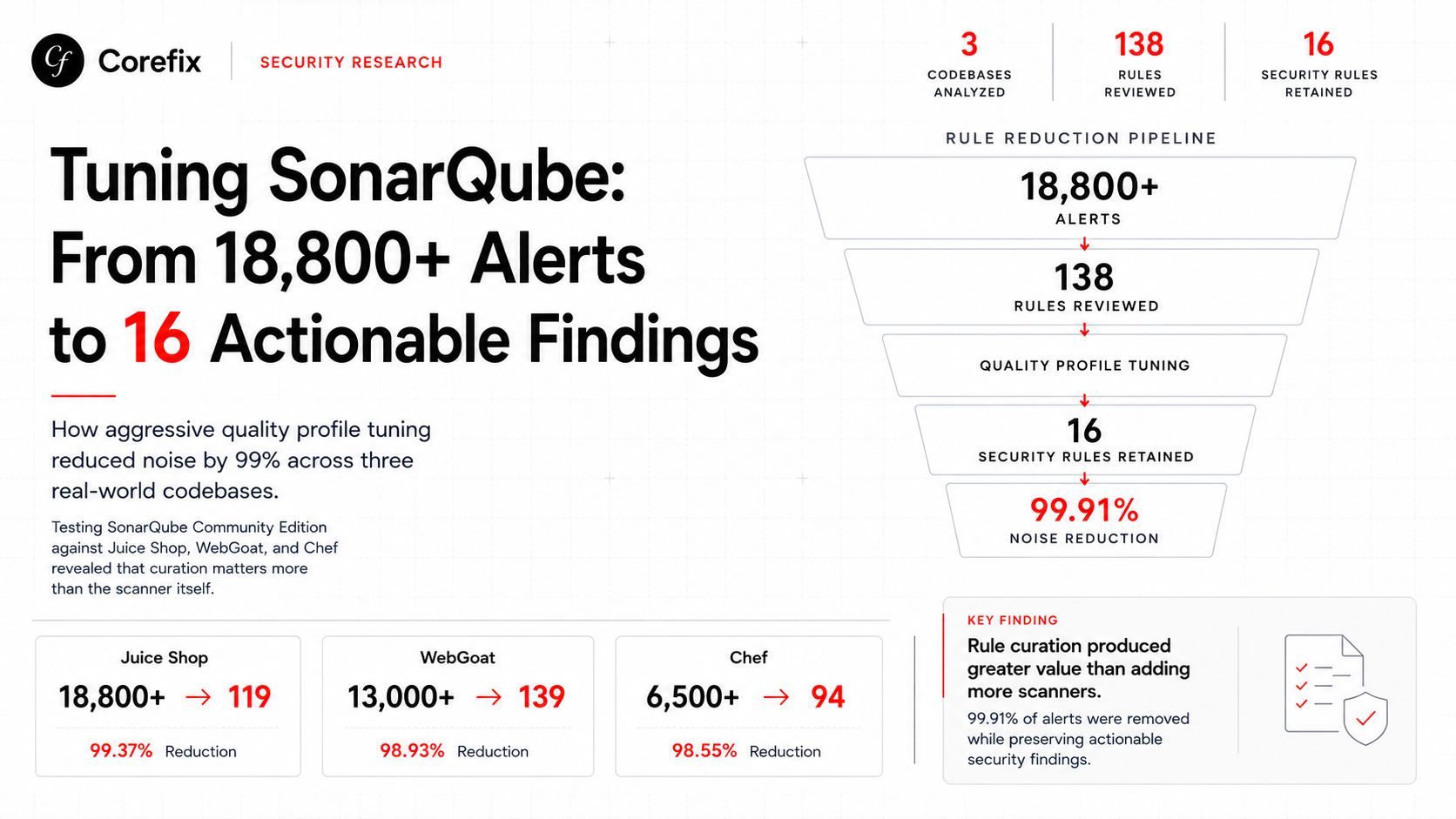

We integrated SonarQube Community Edition into our security scanning pipeline as a stateless container on AWS Fargate. What we found challenged everything we assumed about SonarQube's value — and led us to a quality profile that reduces findings by over 99% while keeping every result actionable.
This is the story of how we tuned SonarQube across three deliberately vulnerable and real-world codebases, what we learned about Community Edition's actual capabilities, and why curation matters more than the scanner itself.
The Architecture: Stateless SonarQube on Fargate
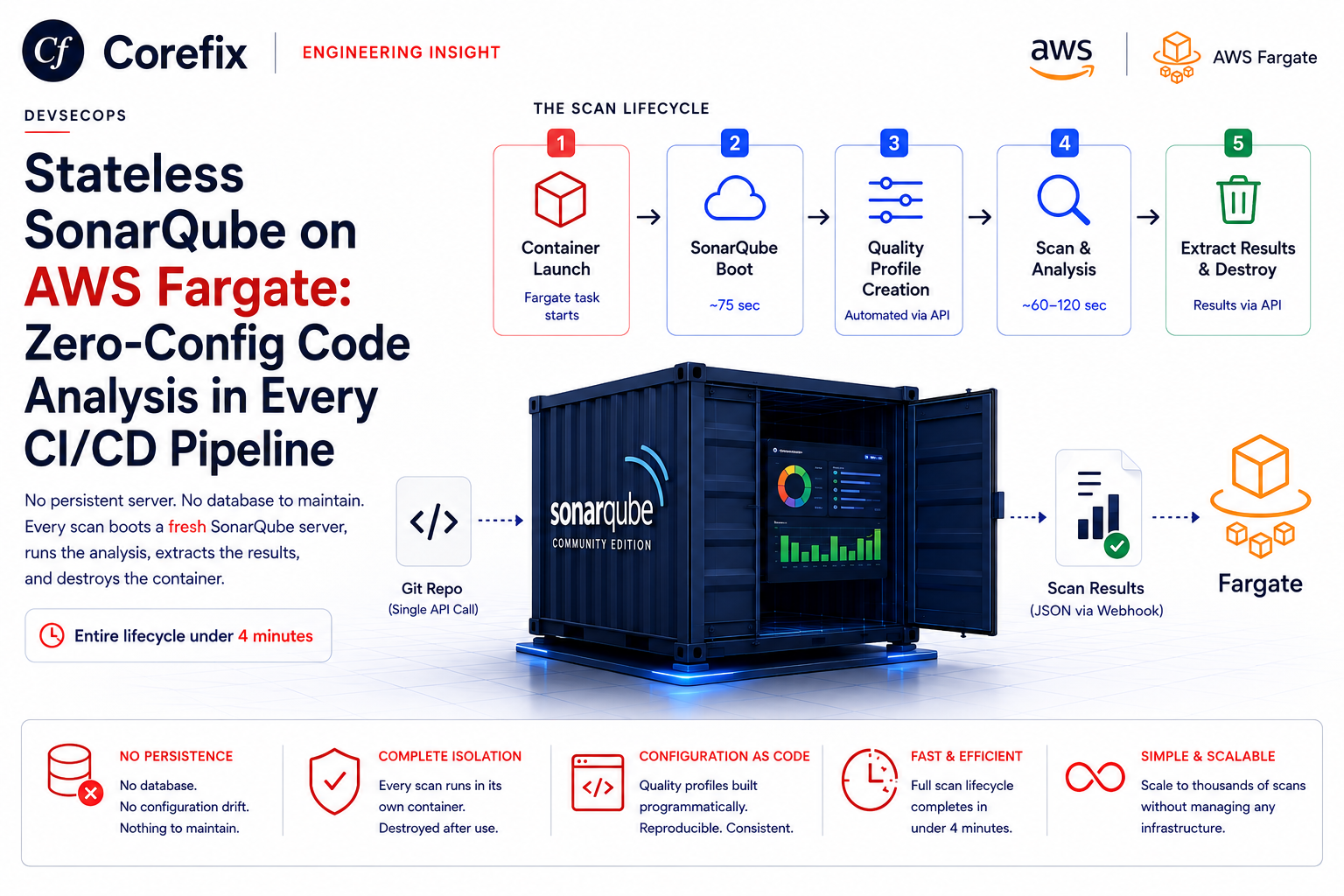
Setting up SonarQube is notoriously painful — Elasticsearch configuration errors, plugin installation nightmares, project registration, and CLI setup. We eliminated all of that by building a Docker image with SonarQube pre-configured and running it statelessly.
Each scan follows a simple lifecycle: a fresh container boots (~60 seconds), we register the project, create a quality profile with curated rules, perform the scan, extract findings with precise code locations and snippets, and then the container is destroyed. No persistent state, no infrastructure to maintain, no accumulated technical debt in the tool itself.
This approach let us iterate rapidly on quality profile tuning — every scan started clean, every profile was built from scratch, and we could A/B test rule configurations across multiple codebases in minutes.
The Starting Point: Default Profile Chaos
We started by running SonarQube's default quality profile — all rules enabled, no filtering — against three codebases to establish a baseline.
Juice Shop (OWASP) — JavaScript/TypeScript
Juice Shop is OWASP's deliberately vulnerable web application. It contains over 100 intentionally planted security issues including SQL injection, XSS, SSRF, XXE, path traversal, and prototype pollution.
Default profile result: 18,800+ findings across 138 unique rules.
Out of 138 unique rule types, only 2-3 were security-relevant. The rest were code style opinions: "use const instead of let," "lines should not be too long," "naming conventions," "cognitive complexity," "don't use the ternary operator," "use template literals instead of concatenation." This is ESLint and Prettier territory — not security analysis.
The scanner analyzed 371 TypeScript files and found thousands of style violations but missed the vast majority of intentionally planted vulnerabilities.
WebGoat (OWASP) — Java
WebGoat is the gold standard for testing Java SAST tools. It's a Spring Boot application with intentional SQL injection, XSS, SSRF, XXE, deserialization, and path traversal — all with multi-file dataflow paths that a taint analyzer should catch.
Default profile result: 13,000+ findings.
Same pattern. Thousands of code quality opinions, near-zero security findings.
Chef — Ruby (Real-World Open Source)
A large, real-world Ruby codebase. Not deliberately vulnerable, but complex enough to stress-test rule configurations.
Default profile result: 6,500+ findings, overwhelmingly code smells and style violations.
The Filtering Journey
We systematically stripped the quality profile down through four iterations, measuring the impact at each step.
Iteration 1: Remove Pure Maintainability Rules
We removed all rules focused purely on maintainability — cognitive complexity, naming conventions, code duplication, method length, line length. These are linter concerns, not security findings.
Chef: Dropped from 6,500+ raw default to ~420 findings.
Still too noisy. The remaining findings were dominated by CWE-tagged code smells.
Iteration 2: Remove INFO Severity
SonarQube assigns INFO severity to findings like TODO/FIXME comment tracking (mapped to CWE-546 "Suspicious Comment") and minor style issues. These have CWE tags but zero security relevance.
Chef: 420 → ~210 findings. Roughly a 50% reduction.
Removing the lowest-severity tier cut the count in half, confirming that a significant portion of "CWE-tagged" findings are trivially low-value.
Iteration 3: Remove MAJOR Severity Code Smells
SonarQube's severity assignments are generous. MAJOR is the default bucket where most code smells land. We tested keeping only BLOCKER and CRITICAL severity CWE-tagged code smells.
Chef: 210 → ~110 findings. Another ~50% reduction.
Each severity tier we removed cut the count roughly in half — a consistent pattern that revealed how SonarQube's severity distribution is heavily weighted toward the middle.
Iteration 4: Focus on Vulnerability and Bug Types Only
We stripped the profile to its core: all VULNERABILITY-type rules (any severity), BLOCKER/CRITICAL BUG-type rules, and CWE-tagged BUG rules. No code smells at all.
Chef: 110 → 94 findings across 16 unique rules. All actionable.
Juice Shop: 18,800 → 119 findings across 7 unique rules.
WebGoat: 13,000 → 139 findings across 18 unique rules.
The Final Quality Profile
Four API calls, each additive, building a single profile per language:
1. All VULNERABILITY rules (any severity) Catches exploitable security weaknesses — SQL injection, XSS, path traversal, insecure deserialization, command injection, SSRF, and hardcoded credentials.
2. BLOCKER/CRITICAL BUG rules High-severity bugs that cause crashes and production failures — null pointer dereferences, unclosed resources, impossible conditions from dataflow analysis.
3. CWE-tagged BUG rules (any severity) Security-adjacent bugs that carry CWE identifiers — things like unchecked error conditions and improper resource handling that pattern-match rules might classify as bugs rather than vulnerabilities.
Each call activates rules into the same profile. Overlapping rules are activated once. The result is a focused profile of roughly 150-200 rules per language instead of SonarQube's default 2,000+.
The Taint Analysis Question
The primary reason we integrated SonarQube was for interprocedural taint analysis — tracing untrusted data across method calls, class boundaries, and file imports. We assumed Community Edition provided this for compiled languages when bytecode was available.
We tested this assumption rigorously.
What We Expected
For Java projects compiled with Maven, we expected SonarQube to produce findings with populated flows fields showing tainted data moving from source to sink:
Flow 1: "User input received"        → Controller.java:42
Flow 2: "Passed to processData()"    → Service.java:87
Flow 3: "Concatenated into query"    → Repository.java:31
Flow 4: "Executed as SQL"            → Repository.java:35 (SINK)
What We Actually Got
On WebGoat — a Java application with intentional multi-file injection paths — compilation succeeded, bytecode was available, and SonarQube analyzed 257 source files with access to target/classes.
Result: 18 findings. All code quality issues. Zero vulnerabilities. Zero populated taint flows.
No SQL injection detected. No XSS. No path traversal. No SSRF. No XXE. On an application specifically designed to contain all of these with multi-file dataflow paths.
The flows fields we did see contained complexity increment counters — "+1," "+2 (incl 1 for nesting)" — not dataflow traces. This is SonarQube showing where cognitive complexity score increases happen, not where tainted data propagates.
The Confirmation
SonarQube's own documentation confirms it: taint analysis is available in SonarQube Server commercial editions (Developer Edition and above) and SonarQube Cloud. Community Edition does not include the taint analysis engine.
The sonar-java open-source GitHub repository contains the 600+ pattern-matching rules for code quality and bugs. The taint analysis engine is proprietary and closed-source.
Compilation and bytecode access in Community Edition enables slightly deeper pattern analysis (we gained 3 additional code quality findings on WebGoat with bytecode vs. without), but it does not unlock taint analysis.
The Reduction in Numbers
| Codebase | Default Profile | Tuned Profile | Reduction | Unique Rules |
|---|---|---|---|---|
| Juice Shop (JS/TS) | 18,800+ | 119 | 99.37% | 7 |
| WebGoat (Java) | 13,000+ | 139 | 98.93% | 18 |
| Chef (Ruby) | 6,500+ | 94 | 98.55% | 16 |
After grouping findings by rule (normalization), 119 instances on Juice Shop collapse to 7 unique rule types, 139 on WebGoat collapse to 18, and 94 on Chef collapse to 16. Multiple instances of the same rule across different files are grouped together — one explanation, one fix pattern, multiple locations.
The filtered findings are overwhelmingly VULNERABILITY-type (hardcoded credentials, exposed secrets) and high-severity BUG-type (unclosed resources, null safety). Every finding is something a developer should actually look at and act on.
An 18,800-finding report gets closed immediately. A 119-finding report with 7 distinct issue types gets read, understood, and fixed.
What SonarQube Community Edition Actually Provides
After extensive testing across three codebases and multiple languages, here is what Community Edition genuinely contributes:
Pattern-matching security rules — secrets detection (hardcoded passwords, API keys, private keys), basic injection pattern matching (obvious SQL concatenation, eval usage), and security hotspot identification. These overlap significantly with what OpenGrep and similar pattern-matching scanners already provide.
Reliability rules for compiled languages — with bytecode available, SonarQube catches some cross-method null safety issues and resource lifecycle problems that pure AST pattern matching misses. The incremental value is small (3 extra findings on WebGoat) but real.
Code quality rules at scale — if code quality analysis is your goal, SonarQube's rule library is comprehensive. But this is a linter function, not a security scanner function.
What it does NOT provide in Community Edition: taint analysis, cross-file dataflow tracking, source-to-sink vulnerability tracing, or any analysis that requires understanding how data flows through an application across method and file boundaries.
Lessons Learned
Curation is more valuable than the scanner. The difference between 18,800 useless findings and 16 actionable ones isn't a better scanner — it's a better quality profile. The same curation mindset applied to any scanner's rule set will produce similar improvements.
Severity labels are unreliable. SonarQube labels TODO comments as CWE-546 and assigns MAJOR severity to line-length violations. Filtering by type (VULNERABILITY, BUG) is more reliable than filtering by severity alone.
Default profiles are designed for breadth, not signal. SonarQube's defaults activate every available rule because SonarQube is designed as a comprehensive code quality platform, not a security scanner. Using it as a security scanner requires aggressive rule curation.
Test your assumptions with deliberately vulnerable code. We assumed Community Edition did taint analysis for two years. Running it against WebGoat with compilation took 30 minutes and definitively proved it doesn't. Test assumptions early with known-vulnerable applications.
Noise trains developers to ignore results. An 18,800-finding report gets closed immediately. A 16-finding report gets read. Signal-to-noise ratio is the most important metric for any scanning tool.
Our Current Architecture
SonarQube runs as an optional scanner in our pipeline, activated when enterprise customers need it for compliance checklists or when scanning Java/C# projects where the bytecode-enhanced pattern matching adds marginal value.
The core scanning pipeline uses pattern-matching scanners with community-contributed security rule sets as the primary detection layer, with an LLM-powered remediation layer that confirms exploitability, explains risk in context, and generates fixes.
The quality profile tuning we developed — stripping SonarQube from 2,000+ rules to ~200 focused rules — is the real intellectual property. That same curation approach applies to every scanner in the pipeline: start with everything, measure against known-vulnerable applications, and ruthlessly eliminate noise until every finding is actionable.